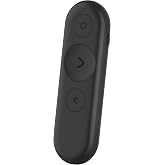
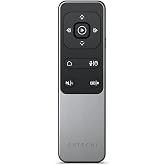
Logitech Spotlight 2 Presentation Remote Wireless Clicker - Light Lilac
Present confidently with haptic feedback that pulses when you press the highlight button.
Logitech Spotlight 2 Presentation Remote Wireless Clicker - Light Lilac
зүйлийн дугаар: 229599107

Logitech Spotlight 2 Presentation Remote Wireless Clicker - Light Lilac

зүйлийн дугаар: 229599107

MNT 590552

Price Details

Excluding Shipping & Custom charges ( Shipping and custom charges will be calculated on checkout )

*All items will import from АНУ

Нөөцөд байна
АНУ USA дэлгүүрээс импортолсон
Яг одоо захиалаад ойрын хугацаанд хүлээн аваарай Баасан гараг, 9 дүгээр сар 11
Our Top Logistics Partners
  • fedex
  • dhl
Present confidently with haptic feedback that pulses when you press the highlight button.
U-Care баталгаа:
Байхгүй
Төлөвлөгөө сонгох
fast shipping

Fast
Shipping

free return

Free
Return*

secure packaging

Secure Packaging

100% original products

100% Original Products

pci-dss

PCI DSS Compliance

iso certified

ISO 27001 Certified


paypal payment
visa payment
mastercard payment
Note: Step Down Voltage Transformer required for using electronics products of АНУ store (110-120). Recommended power converters Одоо худалдаж авах.

What Stands Out

Haptic Feedback
Experience precise control with haptic feedback, allowing you to feel each action, ensuring your presentations flow smoothly without distracting interruptions.
Digital Highlighting
Engage your audience with digital highlighting that lets you emphasize key points directly on the screen, making your presentation more interactive and impactful.
Customizable Actions
Tailor your remote to suit your style with customizable actions for buttons, enhancing your efficiency and empowering you to present seamlessly.

Бүтээгдэхүүний дэлгэрэнгүй мэдээлэл

Shop Logitech Spotlight 2 Presentation Remote Wireless Clicker - Light Lilac online at a best price in Mongolia. B0H4QVHG95
Package Weight1 Pound

Who Should Buy?

Suitable For
  • Professional Presenters

    Ideal for professionals who regularly give presentations, enhancing their delivery with seamless control and effective engagement.

  • Educators

    Perfect for teachers and trainers who need to convey information clearly while managing slides and highlighting content effectively.

  • Remote Workers

    Useful for remote workers conducting virtual meetings, allowing easy navigation of slides and content sharing without distractions.

Not Suitable For
  • Casual Users

    Not suited for casual users or infrequent presenters who may find its features overwhelming or unnecessary.

БАРААНЫ ТАЙЛБАР

Logitech Spotlight 2 Presentation Remote Wireless Clicker - Light Lilac

Асуулга байна уу? Бидэнтэй чатлаарай

Хэрэглэгчийн асуулт, хариулт

  • Асуулт: What features does the Logitech Spotlight 2 Presentation Remote offer?

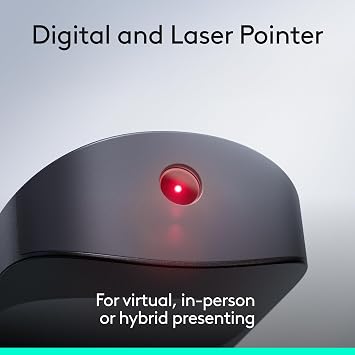
    Хариулт: The Logitech Spotlight 2 Presentation Remote includes digital highlighting, customizable actions, and a built-in laser pointer. It allows users to highlight areas of their presentation in real-time, making it easier to capture the audience's attention. With Bluetooth and USB-C connectivity, it supports a wide range of devices, ensuring flexibility during presentations. The quick charge feature also benefits users who need to recharge quickly, giving them more time to focus on their content rather than on battery life.
  • Асуулт: How does the quick charge feature work on the Logitech Spotlight 2?

    Хариулт: The quick charge feature on the Logitech Spotlight 2 allows users to get up to an impressive three hours of usage with just a one-minute charge. This is particularly useful in scenarios where time is limited, such as when a presenter is running late or a last-minute meeting is called. Charging through USB-C not only speeds up the process but also means you can use the remote with various modern devices.
  • Асуулт: Is the Logitech Spotlight 2 compatible with all devices?

    Хариулт: Yes, the Logitech Spotlight 2 is designed to be compatible with a wide range of devices, including Windows, macOS, and most presentation software. It connects via Bluetooth or USB receiver, making it versatile for use with laptops, desktops, and even some tablets. This flexibility makes it ideal for professionals who switch between different devices during their presentations.
  • Асуулт: Can I customize the actions on the Logitech Spotlight 2?

    Хариулт: Absolutely! The Logitech Spotlight 2 allows for customizable actions, enabling users to configure the buttons according to their preferences and presentation needs. Users can assign specific functions such as advancing slides, going back, or launching applications. This feature enhances the user experience, allowing presenters to streamline their workflow and focus on delivering engaging content.
  • Асуулт: How does the haptic feedback feature enhance presentations?

    Хариулт: The haptic feedback feature of the Logitech Spotlight 2 provides subtle vibrations to signal successful clicks or actions. This sensory feedback allows presenters to maintain focus on their content instead of visually checking their remote. Especially during crucial moments in a presentation, this feature helps users stay on track and enhances the overall engagement by allowing more seamless interactions without distractions.
  • Асуулт: What is digital highlighting and how is it used?

    Хариулт: Digital highlighting is a remarkable feature of the Logitech Spotlight 2 that allows presenters to highlight areas on their screen or documents during a presentation. By using different colors, users can draw attention to specific data points or visuals, making their arguments more persuasive. This feature is particularly effective in educational settings or business meetings where clarity and emphasis on key information are essential.
  • Асуулт: How should I set up the Logitech Spotlight 2 for my presentations?

    Хариулт: Setting up the Logitech Spotlight 2 is straightforward. First, ensure the remote is charged and connect it via Bluetooth or the included USB receiver to your device. Next, download the Logitech Presentation app to access customization options and set up your preferred actions. Once configured, you can practice using the remote to get comfortable with its functionalities. This preparation will enhance your confidence and effectiveness when you deliver your presentation.
  • Асуулт: Is the Logitech Spotlight 2 easy to carry around?

    Хариулт: Yes, the Logitech Spotlight 2 is designed with portability in mind. Its lightweight and compact design make it easy to carry in a pocket or bag, making it an ideal companion for presenters who travel frequently. Whether you are heading to a conference or a client meeting, the device is convenient and accessible, ensuring you’re always prepared.
  • Асуулт: How does the laser pointer function of the Logitech Spotlight 2 work?

    Хариулт: The laser pointer function on the Logitech Spotlight 2 allows presenters to direct attention to specific parts of their visuals or documents. With a simple press of a button, the laser pointer highlights critical areas without disruptively obstructing the view. This feature is essential for conveying complex information clearly, particularly during technical discussions where precise data presentation is vital.
  • Асуулт: Where can I buy the Logitech Spotlight 2 Presentation Remote in Mongolia?

    Хариулт: You can purchase the Logitech Spotlight 2 Presentation Remote Wireless Clicker Haptics from Ubuy in Mongolia. Ubuy offers a convenient shopping experience with access to a wide selection of Logitech products, ensuring that you find the exact item you need for your presentations. Browsing their platform allows you to compare features, read reviews, and securely complete your purchase.

Logitech Presentation Remotes Editorial Review

Logitech Spotlight 2 Presentation Remote Wireless Clicker Haptics - Black is a sophisticated tool designed for impactful presentations. Featuring digital highlighting, customizable actions, and a built-in gyroscope for smooth cursor control, this remote ensures a polished delivery for both in-person and virtual audiences. With modern USB-C fast charging, it provides several hours of power from a brief charge. Users appreciate the haptic feedback that confirms actions, eliminating the need to look down during presentations. However, to unlock advanced features like digital zooming, the host must install Logitech’s Presentation app, which can be a limitation in certain corporate environments. Overall, it's ideal for professionals looking to enhance their presentation experience.

Customer Reviews & Ratings

1 Хэрэглэгчийн үнэлгээ
  • 5 од
    100%
  • 4 од
    0%
  • 3 од
    0%
  • 2 од
    0%
  • 1 од
    0%

Энэ бараанд шүүмж өгөх

Бусад хэрэглэгчидтэй санал бодлоо хуваалцана уу

Давуу тал

  • Digital highlighting enhances visibility during presentations
  • Gyroscope control for interactive presentations
  • USB-C fast charging allows quick power-ups
  • Silent haptic feedback aids time management
  • Compatible with PCs and Macs for versatility

Сул талууд

  • A protective case is not included for transport.

Platform Trust & Buyer Confidence

trustpilot logo
4.2/5 9300 + reviews
Read reviews
JG
Jazz
Verified buyer

“Easy to use and always helpful and sorts any issues I've had past and present”

1 September 2026 · via Trustpilot
EK
Emmanuel
Verified buyer

“I always receive support when I engage customer service. Overall my experience with UBUY has been top notch. Keep up the good work.”

31 August 2026 · via Trustpilot
F
fnd
Verified buyer

“The delivery was fast and the product came undamaged and authentic.”

29 August 2026 · via Trustpilot
LC
Leana
Verified buyer

“Ubuy is extremely efficient and to order online is an easy process. The verity of products to buy is really unlimited! My order was urgent and I got it on time. The products are great! Thank you Ubuy!”

25 August 2026 · via Trustpilot
HL
Hengo
Verified buyer

“Fast, convenient and cheap. Great store!”

27 August 2026 · via Trustpilot
Найдвартай төлөлт Global Delivery Easy Returns Genuine Products

Product Price History

Чухал мэдээлэл

  • Хязгаарлалт : Олон улсын хүргэлтээр илгээгдсэн барааны тохиолдолд, үйлдвэрлэгчийн баталгаа хүчингүй байх, үйлдвэрлэгчийн үйлчилгээ хүргэх боломжгүй, барааны заавар, гарын авлага болон анхааруулга очих улсын хэлдээр биш байх магадлалтай гэдгийг анхаарна уу. Мөн бараа болон дагалдах хэрэгсэл нь тухайн улсын стандартыг мөрдөөгүй, чанарын заалт болон шошгын шаардлагыг хангаагүй байх магадлалтай бөгөөд, тухайн улсын цахилгааны вольтод тохирохгүй байж болзошгүй (тохирох адаптер болон хувиргагч шаардлагатай) юм. Хүлээн авагч нь барааг тухайн улс уруу хуулийн дагуу импортлогдохыг батлах ёстой. Ubuy болон түүний холбоот түншүүдээс худалдан авсан тохиолдолд худалдан авагч нь хүлээн авах улсын бүх хууль болон заалтуудыг мөрдөх ёстой.
  • Ubuy нь дэлхий даяар хэрэглэгддэг хайлтын хэрэгсэл учраас Ubuy дээр байгаа бараа бүр зарагдана гэсэн үг биш. Бараанууд нь экспорт болон худалдааны журмыг дагаж мөрдөх ёстой.