- Нүүр хуудас /
- Цахилгаан бараа /
- Computer Accessories /
- Computer Accessories & Peripherals /
- Keyboards, Mice & Accessories /
- Logitech MX Master 4 for Mac Ergonomic Wirele...
0 ratings


зүйлийн дугаар:
219397183
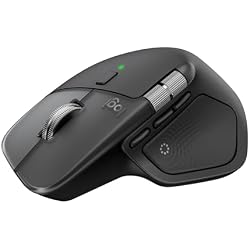
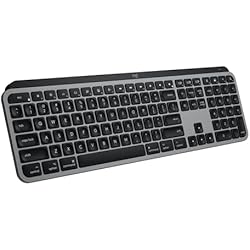
Logitech MX Master 4 for Mac Ergonomic Wireless Bluetooth Mouse with Haptic Feedback + MX Keys S for Mac Wireless Bluetooth Keyboard with Backlit Low
зүйлийн дугаар:
219397183
MNT 1048545
Price Details
Excluding Shipping & Custom charges ( Shipping and custom charges will be calculated on checkout )
*All items will import from АНУ
6%
Нөөцөд байна
 USA дэлгүүрээс импортолсон
Secured transaction
Ubuy works hard to protect your security and privacy. Our advanced payment security system ensures confidentiality by encrypting your information during transmission using AES (Advanced Encryption Standards) and SSL (Secure Socket Layer) protocols. Your payment details are 100% secure as we do not share your payment details with third party sellers.
Our Top Logistics Partners


Mastered for Mac: With matching Apple finishes, Logi Options+ functions for macOS, MX Master 4 for Mac makes for a perfect fit with your Apple setup.
Энэ багцад 2 зүйл багтсан

Fast
Shipping

Free
Return*

Secure Packaging

100% Original Products

PCI DSS Compliance

ISO 27001 Certified


Note: Step Down Voltage Transformer required for using electronics products of АНУ store (110-120). Recommended power converters Одоо худалдаж авах.


What Stands Out
Ergonomic Design
The MX Master 4 offers exceptional comfort during extended use, reducing strain on your wrist and hand, making it perfect for long work sessions.
Haptic Feedback
This mouse features advanced haptic feedback, providing tactile responsiveness for enhanced precision and an immersive user experience, perfect for creative tasks.
Wireless Convenience
Both the mouse and keyboard connect seamlessly via Bluetooth, eliminating clutter and allowing for a tidy workspace, while also supporting multiple devices for flexibility.
Бүтээгдэхүүний дэлгэрэнгүй мэдээлэл
- Mastered for Mac: With matching Apple finishes, Logi Options+ functions for macOS (1), USB-C charging while you work (cable not included), MX Master 4 for Mac makes for a perfect fit with your Apple setup
- Precision you can feel with the Haptic Sense Panel; customizable (1) haptic feedback on specific actions, shortcuts, notifications enhancing productivity on this wireless Bluetooth mouse
- Effortlessly access favorite tools with Actions Ring (2) on this MX Series mouse—a dynamic, customizable overlay adapts to each app, placing most used filters, adjustments, and shortcuts at your cursor
- Mastered for Mac: With a Mac key layout and matching Apple finishes, Logi Options plus functions for macOS (1), USB C charging, Logitech MX Keys S for Mac makes for a perfect fit with your Apple setup
- Fluid Typing Experience: A laptop-like profile with spherically dished keys shaped for your fingertips; experience fast, fluid, and precise typing on this wireless bluetooth keyboard for Mac
- Automate Repetitive Tasks with Logitech Keyboard: Easily create and share time-saving Smart Actions shortcuts to perform multiple actions with a single keystroke with the Logi Options plus app (1)
| Connectivity Technology | Bluetooth |
| Other Special Features of the Product | Haptic Feedback, Backlit Keys, Customizable Shortcuts |
| Compatible Devices | Laptop, Tablet |
| Keyboard Layout | QWERTY |
| Minimum Required Operating System Version | Mac OS 10.15 Catalina |
| Operating System | Mac OS |
| Color | Space Black |
| Brand | Logitech |
| Keyboard Description | Wireless Bluetooth Keyboard with Backlit Low Profile Keys |
| Unit Count | 1 Count |
| Special Feature | Haptic Feedback, Backlit Keys, Customizable Shortcuts |
| Item Weight | 1.6 lbs (730 grams) |
Who Should Buy?

-
Creative Professionals
Graphic designers and video editors can leverage precision controls and customizable buttons for enhanced productivity and workflow.
-
Frequent Travelers
Compact design and wireless functionality make this combo ideal for users who work on-the-go or in various locations.
-
Writers and Programmers
Backlit keys and ergonomic design offer comfort and visibility, making long typing sessions less fatiguing.

-
Budget Users
Those looking for affordable peripherals may find this premium-priced combo beyond their financial reach.
БАРААНЫ ТАЙЛБАР
Асуулга байна уу? Бидэнтэй чатлаарай
Хэрэглэгчийн асуулт, хариулт
-
Асуулт:
What are the key features of the Logitech MX Master 4 for Mac?
Хариулт: The Logitech MX Master 4 for Mac boasts several key features including advanced performance haptic feedback, ultra-fast scrolling, and a comfortable ergonomic design tailored for Mac users. This Bluetooth mouse uses USB-C charging to ensure rapid power recharging, providing seamless connectivity with your Mac device. Its haptic feedback enhances user experience, confirming your actions intuitively. Ideal for creative professionals or anyone working long hours, this mouse offers an agile, precise performance, making it suitable for tasks ranging from graphic design to data analysis. -
Асуулт:
How does the ergonomic design of the MX Master 4 benefit users?
Хариулт: The ergonomic design of the MX Master 4 is specifically crafted to fit the natural contours of your hand, which can reduce wrist strain and enhance comfort during extended use. With its comfortable grip, this mouse allows for fluid movement and easy navigation, making it perfect for professionals who spend long hours on their computers. Whether you’re scrolling through documents or designing graphics, an ergonomic mouse can protect you from discomfort, thereby improving productivity and overall enjoyment while working. -
Асуулт:
Is the Logitech MX Master 4 compatible with non-Mac devices?
Хариулт: Yes, the Logitech MX Master 4 is compatible with both Windows and Mac operating systems, thanks to its universal Bluetooth connectivity. This makes it a versatile choice for users who might switch between devices or work in mixed environments. If you’re using a Windows laptop for a part of your tasks or sharing a workstation, the performance remains consistent and reliable. Users benefit from the customizable functions that can be tailored to different operating systems, ensuring an efficient workflow regardless of the device. -
Асуулт:
What makes the haptic feedback feature a significant addition?
Хариулт: The haptic feedback feature in the Logitech MX Master 4 enhances the user experience by providing tactile responses that confirm actions, such as scrolling or switching between applications. This feedback allows users to have greater precision and confidence in their navigational choices. Particularly useful for designers and programmers, it helps in making rapid selections without visual confirmation. As you engage with large datasets or projects, the intuitive feel adds another layer of control and precision to your workflow. -
Асуулт:
How long does the battery last on the Logitech MX Master 4?
Хариулт: The Logitech MX Master 4 features an impressive battery life, allowing up to 70 days of use on a full charge. This extended battery life minimizes the need for frequent recharging, making it suitable for on-the-go professionals. The USB-C charging also facilitates quick recharging, which means you can get back to work faster when needed. Imagine being in a critical presentation without worrying about battery levels, enabling a smooth and uninterrupted performance throughout the day. -
Асуулт:
Can I customize the button functions on the MX Master 4?
Хариулт: Absolutely! The Logitech MX Master 4 allows extensive customization of its buttons through the Logitech Options software. Users can assign specific functionalities tailored to their workflows, whether it's switching applications, editing shortcuts, or controlling audio volume. This feature is especially beneficial for power users and professionals looking to streamline their tasks. By optimizing button functions for common actions, you’ll enhance your productivity and reduce effort during complex tasks. -
Асуулт:
What is ultra-fast scrolling and when would I use it?
Хариулт: Ultra-fast scrolling is a feature that allows users to glide through lengthy documents or webpages with remarkable ease. By simply scrolling, users can transition from one end of a file to another in seconds. This is particularly useful for professionals handling large documents or researchers sifting through extensive data. The smart switching between click-to-click and free-spinning modes enhances the efficiency of working through various content types, making it ideal for both casual and intensive users. -
Асуулт:
How do I set up the Logitech MX Master 4 with my Mac?
Хариулт: Setting up the Logitech MX Master 4 with your Mac is a straightforward process. First, ensure the mouse is charged, then power it on and put it into pairing mode. Open your Mac's Bluetooth settings and select the mouse from the list of available devices. Once paired, you can download Logitech Options software to customize settings and features as per your needs. This setup allows you to start using the mouse's full capabilities immediately while enjoying a direct connection with your Mac. -
Асуулт:
Where can I buy the Logitech MX Master 4 for Mac?
Хариулт: You can purchase the Logitech MX Master 4 for Mac from Ubuy. This platform offers a convenient way to explore various purchasing options and ensures that you can find the perfect fit for your ergonomic needs in Mongolia. By visiting Ubuy, you can enjoy a straightforward shopping experience dedicated to providing high-quality tech products with reliable service. -
Асуулт:
What materials are used in the construction of the MX Master 4?
Хариулт: The Logitech MX Master 4 is constructed using premium materials that ensure both durability and a professional look. The surface features a soft-touch finish that provides a refined feel while reducing slippage during use, helping maintain grip even during intensive tasks. The solid build also assures users that the mouse can withstand the rigors of daily use. Whether you’re in a corporate office or working remotely, the quality materials contribute to a professional aesthetic that matches various work environments.
Logitech Keyboards, Mice & Accessories Editorial Review
The Logitech MX Master 4 for Mac is garnering praise across the board for its exceptional ergonomic design, advanced features, and high-quality performance. Users frequently highlight the mouse's comfort during prolonged use, with many noting a significant reduction in hand strain, which is often a concern for those spending extensive hours at their desks. The ergonomic shape, combined with improvements in texture and button placement, enhances comfort and usability even further. Performance-wise, the MX Master 4 stands out in terms of precision and responsiveness. The smooth scrolling, accurate tracking, and the addition of customizable buttons have been warmly received, allowing users to tailor the mouse to their workflow. Its seamless integration with software applications, especially creative tools like Photoshop and Premiere, has been particularly highlighted, as it enhances productivity through features like the Actions Ring. Battery life is Consistently mentioned as another strong point, with users reporting that they rarely, if ever, need to recharge the mouse. The Bluetooth connection is stable, allowing for smooth transitions between multiple devices, which many users find invaluable in their multi-device work environments. Despite being priced above average, many customers feel that the MX Master 4 is worth the investment due to its durability, advanced features, and the quality of life improvements it brings to daily tasks. Overall, this mouse seems to have solidified itself as a top choice for professionals seeking an efficient and comfortable input device. **
Customer Reviews & Ratings
1 Хэрэглэгчийн үнэлгээ
-
5 од
0%
-
4 од
100%
-
3 од
0%
-
2 од
0%
-
1 од
0%
Энэ бараанд шүүмж өгөх
Бусад хэрэглэгчидтэй санал бодлоо хуваалцана уу
Давуу тал
- Exceptional ergonomic design reduces hand strain
- Precise tracking and smooth scrolling
- Customizable buttons enhance productivity
- Excellent battery life with infrequent recharges
- Strong Bluetooth connection across multiple devices
- Seamless software integration boosts workflow efficiency
Сул талууд
- Higher price point compared to other mice
Platform Trust & Buyer Confidence

MA
Mohammad
Verified buyer
“Excellent quality and original too,when ubuy send original things I will appreciate that ,I very satisfied thank you”
23 July 2026 · via Trustpilot
CK
Chitra
Verified buyer
“The order and delivery progress was communicated very well. Package arrived within the estimated time. Products arrived as expected in good condition.”
22-Jul-26 · via Trustpilot
K
kund
Verified buyer
“Good supply of products. Safe payment methods, and shipment worldwide! Genuine products.”
23-Jul-26 · via Trustpilot
OO
Onesi
Verified buyer
“Was my first time buying a product from Ubuy, but I found it so helpful. This is reliable. Gonna place a new order!”
22 July 2026 · via Trustpilot
SJ
SAO JOHN
Verified buyer
“Ubuy is a great online platform to buy stuff. Reliable, fast delivery time and great value for money. I've been using Ubuy online shopping platform for three years now and will continue to do so.”
23 July 2026 · via Trustpilot
Найдвартай төлөлт
Global Delivery
Easy Returns
Genuine Products
Product Price History
Чухал мэдээлэл
- Хязгаарлалт : Олон улсын хүргэлтээр илгээгдсэн барааны тохиолдолд, үйлдвэрлэгчийн баталгаа хүчингүй байх, үйлдвэрлэгчийн үйлчилгээ хүргэх боломжгүй, барааны заавар, гарын авлага болон анхааруулга очих улсын хэлдээр биш байх магадлалтай гэдгийг анхаарна уу. Мөн бараа болон дагалдах хэрэгсэл нь тухайн улсын стандартыг мөрдөөгүй, чанарын заалт болон шошгын шаардлагыг хангаагүй байх магадлалтай бөгөөд, тухайн улсын цахилгааны вольтод тохирохгүй байж болзошгүй (тохирох адаптер болон хувиргагч шаардлагатай) юм. Хүлээн авагч нь барааг тухайн улс уруу хуулийн дагуу импортлогдохыг батлах ёстой. Ubuy болон түүний холбоот түншүүдээс худалдан авсан тохиолдолд худалдан авагч нь хүлээн авах улсын бүх хууль болон заалтуудыг мөрдөх ёстой.
- Ubuy нь дэлхий даяар хэрэглэгддэг хайлтын хэрэгсэл учраас Ubuy дээр байгаа бараа бүр зарагдана гэсэн үг биш. Бараанууд нь экспорт болон худалдааны журмыг дагаж мөрдөх ёстой.
MNT 1048545
Яг одоо захиалаад ойрын хугацаанд хүлээн аваарай Лхагва гараг, 8 дугаар сар 19
This item is not restrict in my country.(Please click on above link if this item is not restrict in your country, So our team will review and allow.)
QTY:
Ердөө 3 бараа үлдсэн байна.
Secured transaction
PCI DSS compliant and ISO 27001:2022 certified, with encrypted payments and full buyer protection on every order.
Our Top Logistics Partners
Fastest cross-border delivery
Онцлог & Давуу талууд
- Designed specifically for Mac with a seamless aesthetic.
- Customizable haptic feedback enhances productivity.
- Access favorite tools through the dynamic Actions Ring.
- Fluid typing experience with a laptop-like profile and unique key design.
- Automate tasks with Smart Actions shortcuts for efficiency.
- USB-C charging allows convenience while you work.
Ubuy Assurance
Experience worry-free shopping with 100% original products, PCI DSS-compliant payment security, ISO 27001-certified data protection, the fastest cross-border delivery, free returns *, and secure packaging on every order.