- Нүүр хуудас /
- Цахилгаан бараа /
- Computers, Laptops and Tablets /
- Computer Accessories /
- Docking Stations & Locks /
- AV Access KVM Switch Docking Station for MacB...
0 ratings


зүйлийн дугаар:
215796381
AV Access KVM Switch Docking Station for MacBook, USB C KVM Switch 2 Monitors 2 Computers, 4K Dual HDMI Displays, 1 Laptop+1 Desktop, Ethernet, 100W
зүйлийн дугаар:
215796381
MNT 1172484
Price Details
Excluding Shipping & Custom charges ( Shipping and custom charges will be calculated on checkout )
*All items will import from АНУ
0 ratings
Шүүмж бичих
Нөөцөд байна
 USA дэлгүүрээс импортолсон
QTY:
Яг одоо захиалаад ойрын хугацаанд хүлээн аваарай Лхагва гараг, 6 дугаар сар 24
Secured transaction
Ubuy works hard to protect your security and privacy. Our advanced payment security system ensures confidentiality by encrypting your information during transmission using AES (Advanced Encryption Standards) and SSL (Secure Socket Layer) protocols. Your payment details are 100% secure as we do not share your payment details with third party sellers.
Our Top Logistics Partners


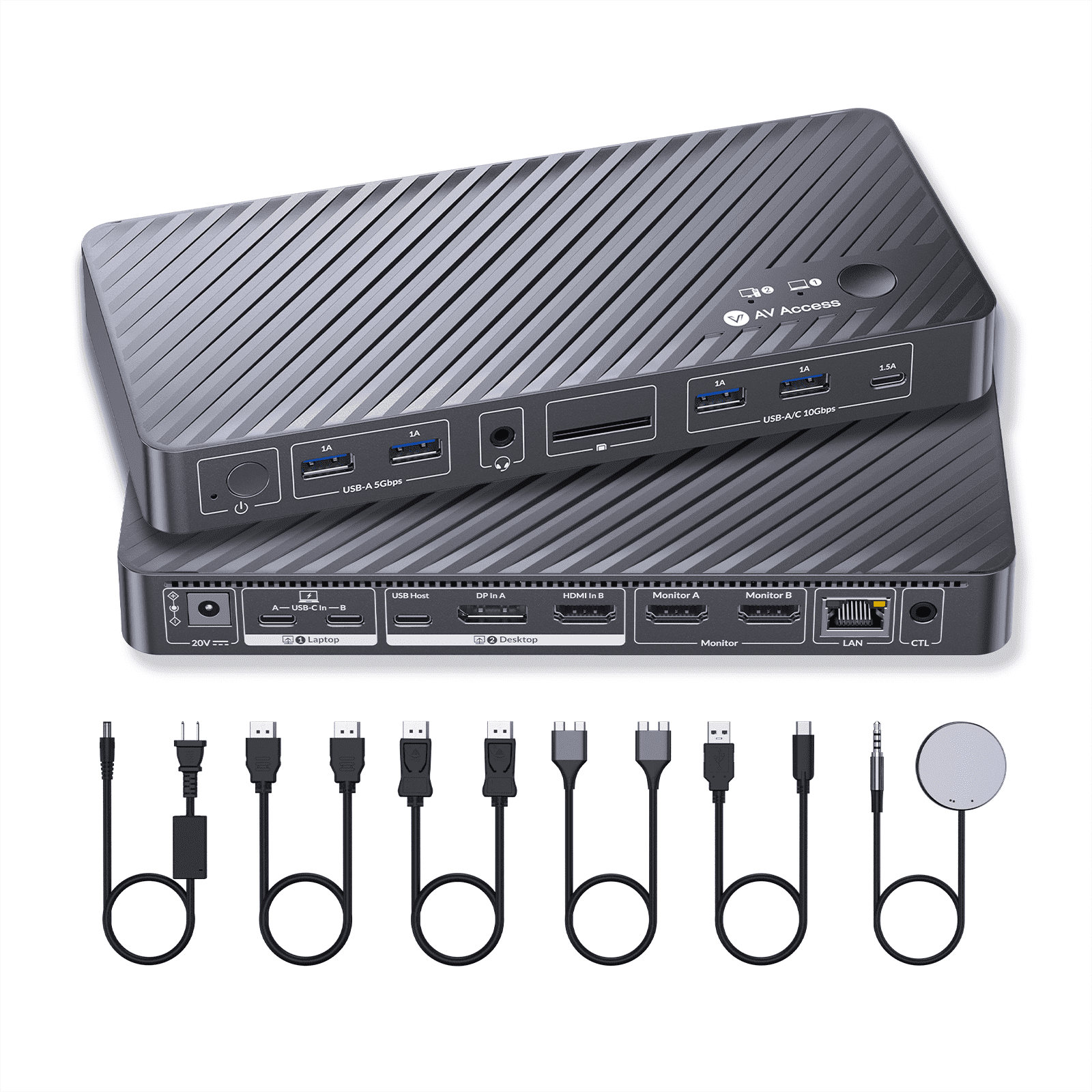
Effortlessly switch between systems using the top-mounted button or included wired remote.

Fast
Shipping

Free
Return*

Secure Packaging

100% Original Products

PCI DSS Compliance

ISO 27001 Certified


Note: Step Down Voltage Transformer required for using electronics products of АНУ store (110-120). Recommended power converters Одоо худалдаж авах.


What Stands Out
Dual Monitor Support
Easily connect two HDMI displays simultaneously for enhanced multitasking, making it an ideal solution for professionals needing improved workspace efficiency.
High Resolution
Supports 4K resolution for both monitors, delivering stunning visuals that elevate productivity and entertainment, providing crystal-clear clarity in presentations and media.
Power Delivery
Equipped with 100W power delivery, this docking station charges devices efficiently while in use, ensuring you stay connected without needing extra power adapters.
Бүтээгдэхүүний дэлгэрэнгүй мэдээлэл
| Compatibility | Laptop & Desktop |
| Maximum number of monitors | 2 |
| Inputs/Outputs | 2 x HDMI video outputs, 2 x USB 3.2 Gen 2 (10Gbps) Type-A ports, 1 x USB 3.2 Gen 2 (10Gbps) Type-C port, 2 x USB 3.2 Gen 1 (5Gbps) Type-A ports, 1 x SD card slot, 1 x Gigabit Ethernet port, 1 x 3.5mm headset jack |
| Resolution | 4K@60Hz |
| Usb version | USB3.0 |
| In/Out type | HDMI |
| Input/output quantity | 1 |
| Brand | v-AV-Access |
| Accessories | 1 x KVM Dock Switcher 1 x Power Adapter (DC 20V/6A) 1 x HDMI 2.0 Cable (L = 1.5m) 1 x DP 1.2a Cable (L = 1.5m) 1 x Dual USB Type-C to Dual USB Type-C Cable (USB 3.2 Gen 2, L = 0.8m) 1 x USB Type-A to USB Type-C Cable (L = 1.8m) 1 x Wired Remote Controller (EXB01) 1 x User Manual |
| Model name | iDock-M10-US |
| Color | Grey |
| Dimensions | 3.99 x 8.66 x 0.99 in (10.1 x 22 x 2.5 cm) |
| Weight | 0.75 lb (340 grams) |
| Input/output direction | Output |
| Has nrtl listing certification | N |
| Country of Origin | This item will be imported from US |
| Date First Available | March 08, 2026 |
| What is in the box | AV Access KVM Switch... For more details, please check description/product details |
Who Should Buy?

-
Multitasking Professionals
Ideal for users who switch between two computers and require dual 4K displays for enhanced productivity.
-
Creative Designers
Great for graphic designers needing high-resolution displays for design work while using a MacBook alongside a desktop.
-
Remote Workers
Perfect for remote workers wanting seamless connectivity between laptop and desktop with efficient power delivery and ethernet.

-
Casual Users
Not ideal for casual users who don’t need multiple screens or switch between devices frequently.
-
Gaming Enthusiasts
Not tailored for gamers looking for high-refresh-rate performance and lower latency connections.
-
Budget-Conscious Buyers
Might not suit users on a tight budget as it carries a premium price for advanced features.
БАРААНЫ ТАЙЛБАР
AV Access KVM Switch Docking Station for MacBook, USB C KVM Switch 2 Monitors 2 Computers, 4K Dual HDMI Displays, 1 Laptop+1 Desktop, Ethernet, 100W Power Delivery, EDID Emulation(iDock M10)
Асуулга байна уу? Бидэнтэй чатлаарай
Хэрэглэгчийн асуулт ба хариултууд
-
Асуулт:
Can I use this docking station with MacBook models that have M1 or M2 processors?
Хариулт: Yes, but only one external monitor is supported; connecting two will cause one display to go black. -
Асуулт:
Does this docking station require additional drivers or software?
Хариулт: No, it works seamlessly without the need for additional drivers or software. -
Асуулт:
How does the Ethernet functionality work when switching between systems?
Хариулт: Both systems remain online simultaneously without interruptions, even while switching control.
v AV Access Docking Stations & Locks Editorial Review
The AV Access KVM Switch Docking Station for MacBook is getting positive feedback from users who appreciate its functionality and design. This compact device allows seamless switching between two USB-C devices, facilitating the use of dual monitors, a keyboard, and a mouse with both a work laptop and a personal desktop. Users praise its ease of setup and the convenience it offers, especially for those working from home who need to switch between devices efficiently. Many customers noted the KVM switch's solid Construction and versatility as it doubles as a docking station with additional ports. There were mentions of some minor issues, such as difficulties with waking monitors from sleep mode and a desire for keyboard hotkey support, which some users feel would enhance usability. However, most found that the product met their expectations and performed its advertised functions well. It's also highlighted that the KVM switch effectively manages various computer setups, although users sometimes encounter challenges with compatibility across different monitors and necessary cables, which may require extra purchases. Despite these challenges, the overall sentiment leans towards satisfaction, especially for those who are tech-savvy and can navigate compatibility issues well. ###
Customer Reviews & Ratings
1 Хэрэглэгчийн үнэлгээ
-
5 од
0%
-
4 од
100%
-
3 од
0%
-
2 од
0%
-
1 од
0%
Энэ бараанд шүүмж өгөх
Бусад хэрэглэгчидтэй санал бодлоо хуваалцана уу
Давуу тал
- Compact design with a small footprint
- Seamless switching between multiple devices
- Allows use of dual monitors, keyboard, and mouse for both computers
- Easy to set up, with all necessary cables included
- Solid build quality and Construction ###
Сул талууд
- Lack of independent control over monitors
Product Price History
Чухал мэдээлэл
- Хязгаарлалт : Олон улсын хүргэлтээр илгээгдсэн барааны тохиолдолд, үйлдвэрлэгчийн баталгаа хүчингүй байх, үйлдвэрлэгчийн үйлчилгээ хүргэх боломжгүй, барааны заавар, гарын авлага болон анхааруулга очих улсын хэлдээр биш байх магадлалтай гэдгийг анхаарна уу. Мөн бараа болон дагалдах хэрэгсэл нь тухайн улсын стандартыг мөрдөөгүй, чанарын заалт болон шошгын шаардлагыг хангаагүй байх магадлалтай бөгөөд, тухайн улсын цахилгааны вольтод тохирохгүй байж болзошгүй (тохирох адаптер болон хувиргагч шаардлагатай) юм. Хүлээн авагч нь барааг тухайн улс уруу хуулийн дагуу импортлогдохыг батлах ёстой. Ubuy болон түүний холбоот түншүүдээс худалдан авсан тохиолдолд худалдан авагч нь хүлээн авах улсын бүх хууль болон заалтуудыг мөрдөх ёстой.
- Ubuy нь дэлхий даяар хэрэглэгддэг хайлтын хэрэгсэл учраас Ubuy дээр байгаа бараа бүр зарагдана гэсэн үг биш. Бараанууд нь экспорт болон худалдааны журмыг дагаж мөрдөх ёстой.
MNT 1172484
Яг одоо захиалаад ойрын хугацаанд хүлээн аваарай Лхагва гараг, 6 дугаар сар 24
This item is not restrict in my country.(Please click on above link if this item is not restrict in your country, So our team will review and allow.)
QTY:
Secured transaction
Ubuy works hard to protect your security and privacy. Our advanced payment security system ensures confidentiality by encrypting your information during transmission using AES (Advanced Encryption Standards) and SSL (Secure Socket Layer) protocols. Your payment details are 100% secure as we do not share your payment details with third party sellers.
Our Top Logistics Partners
Fastest cross-border delivery
Онцлог & Давуу талууд
- Dual USB-C KVM switch docking station designed specifically for MacBooks.
- Supports dual 4K displays for seamless multitasking and minimal interruptions.
- 10-in-1 functionality includes multiple HDMI and USB ports along with Ethernet.
- Full speed 100W USB-C charging keeps your devices powered during use.
- Always-On Gigabit Ethernet ensures constant online access without dropouts.
- EDID management maintains consistent resolutions and display order for a stable experience.