- Нүүр хуудас /
- Компьютер тоглоом /
- PC /
- Дагалдах хэрэгсэл /
- Controllers /
- Flight Controls /
- Logitech G USB G Pro Flight Multi Panel
Logitech G USB G Pro Flight Multi Panel
MNT 678636
Price Details
Excluding Shipping & Custom charges ( Shipping and custom charges will be calculated on checkout )
*All items will import from АНУ
Ubuy works hard to protect your security and privacy. Our advanced payment security system ensures confidentiality by encrypting your information during transmission using AES (Advanced Encryption Standards) and SSL (Secure Socket Layer) protocols. Your payment details are 100% secure as we do not share your payment details with third party sellers.
Fingertip control over a multitude of settings within flight simulator software
Fast
Shipping
Free
Return*
Secure Packaging
100% Original Products
PCI DSS Compliance
ISO 27001 Certified
What Stands Out
Бүтээгдэхүүний дэлгэрэнгүй мэдээлэл
- Fully customizable control panel for flight simulation
- Works with Microsoft Flight Simulator X, 2004, and other major simulation software
- Mounts onto Pro Flight Yoke System or custom cockpit setup
- Compatible with Windows 7, 8, 8.1, and 10 or newer
- Realistic landing gear control with LEDs indicating actual gear status
- Modular and interchangeable for versatile setup configurations
| Item Weight | 2 lbs (910 grams) |
Who Should Buy?
-
Avid Flight Simulators
Ideal for dedicated flight simulation enthusiasts looking for realistic controls and streamlined operation during immersive gameplay.
-
Advanced Gamers
Perfect for experienced gamers wanting customizable controls and intuitive panel layouts for improved gaming performance.
-
Streamlined Cockpit Setup
Great choice for users building a multi-panel cockpit setup seeking enhanced functionality and seamless integration with other hardware.
-
Casual Gamers
May not be suitable for casual gamers who prefer simple gamepads over complex multi-panel setups.
-
Budget-Conscious Buyers
Not ideal for those on a tight budget, as this multi-panel can be expensive compared to basic gaming peripherals.
-
Complete Novices
Unsuitable for beginners to flight simulation, as it may require a learning curve with advanced controls and configurations.
БАРААНЫ ТАЙЛБАР
Logitech G USB G Pro Flight Multi Panel
Хэрэглэгчийн асуулт ба хариултууд
-
Асуулт:
What is the Logitech G USB G Pro Flight Multi Panel used for?
Хариулт: The Logitech G USB G Pro Flight Multi Panel is designed for flight simulation enthusiasts. It allows for realistic control of aircraft operations with dedicated switches for autopilot, flaps, gear, and more. This panel enhances immersion in flight sims like Microsoft Flight Simulator and X-Plane, providing gamers a tactile experience that standard controllers lack. With its customizable buttons and LED displays, users can easily monitor their flight operations, making it ideal for both beginners wanting to get started and seasoned pilots looking for precision. -
Асуулт:
Is the Logitech G USB G Pro Flight Multi Panel compatible with all flight simulation software?
Хариулт: Yes, the Logitech G USB G Pro Flight Multi Panel is compatible with most major flight simulation software. It works seamlessly with platforms like Microsoft Flight Simulator, X-Plane, and Prepar3D. The unit is built to integrate easily with these simulations, providing shortcuts and functionality that enhance your flight experience. If you're a user of multiple flight sims, this versatility means you won't have to invest in different hardware for each title, making it a valuable addition to your setup. -
Асуулт:
Can I customize the buttons on the Logitech G USB G Pro Flight Multi Panel?
Хариулт: Absolutely! The Logitech G USB G Pro Flight Multi Panel comes with customizable buttons that you can program to suit your preferences. You can assign different functions or commands as per your needs using Logitech's G Hub software. This feature is especially useful for creating personalized profiles, allowing you to optimize the panel for specific aircraft or flight missions. Whether you prefer a minimalist approach or need numerous commands at your fingertips, customization ensures you have the ideal setup tailored to your flying style. -
Асуулт:
Does the Logitech G USB G Pro Flight Multi Panel require additional software?
Хариулт: Yes, while the Logitech G Pro Flight Multi Panel can be used with most flight simulation software out of the box, downloading Logitech's G Hub software is recommended for optimal functionality. This program allows users to customize button assignments, update firmware, and create specific profiles for different games. Utilizing G Hub ensures that you can take full advantage of the panel’s capabilities, making your flight simulations more efficient and enjoyable. -
Асуулт:
What features does the Logitech G USB G Pro Flight Multi Panel have?
Хариулт: The Logitech G USB G Pro Flight Multi Panel is packed with features that enhance your simulation experience. It includes multiple dedicated switches for key functions like autopilot and managing flaps, along with a multi-function display that shows vital flight information. Its design allows for easy arrangement alongside other flight gear, facilitating a smoother user experience. Pilots can benefit from the clear visual feedback and tactile controls, which contribute to a more authentic and immersive simulation of real-world flying. -
Асуулт:
Is the Logitech G USB G Pro Flight Multi Panel portable?
Хариулт: While the Logitech G USB G Pro Flight Multi Panel is designed primarily for home use, it is reasonably portable. Its compact size and USB connectivity make it easy to disconnect and move. However, the panel is best suited for a fixed setup where you can connect it to your gaming PC or console. For frequent travelers, consider how it fits in your gaming gear; it's lightweight and can be packed, but due to its specific functionality, you'll benefit most when it's readily accessible in your usual gaming environment. -
Асуулт:
What are the installation steps for the Logitech G USB G Pro Flight Multi Panel?
Хариулт: To install the Logitech G USB G Pro Flight Multi Panel, first connect it to your PC using the provided USB cable. Then, download and install Logitech's G Hub software for optimal configuration. After installation, follow the on-screen prompts to configure your panel and customize button assignments. Once set up, you can launch your flight simulation software, and the panel should automatically integrate. With just these steps, you'll be ready to enhance your flight simulation experience in no time. -
Асуулт:
How does the Logitech G USB G Pro Flight Multi Panel compare to other flight panels?
Хариулт: The Logitech G USB G Pro Flight Multi Panel is known for its quality and functionality compared to other flight panels on the market. It features a robust build, customizable controls, and compatibility with various flight simulation software. Users appreciate its clear multi-function display, which many entry-level panels may lack. While other options may offer more extensive features, the G Pro Flight Multi Panel strikes a balance between price and performance, making it a top choice for those seeking reliable and effective flight control. -
Асуулт:
What should I do if my Logitech G USB G Pro Flight Multi Panel is not working?
Хариулт: If your Logitech G USB G Pro Flight Multi Panel is not functioning properly, first ensure that it is connected securely to your PC. Check the USB port and cable for any damage. If the connection is fine, try reinstalling the G Hub software, as outdated drivers can often cause issues. Additionally, consult the troubleshooting guide in the software or visit the Logitech support website for further assistance. Many users find that reinstalling the software resolves minor technical glitches and restores functionality. -
Асуулт:
Where can I buy the Logitech G USB G Pro Flight Multi Panel in Mongolia?
Хариулт: You can buy the Logitech G USB G Pro Flight Multi Panel in Mongolia from Ubuy. Ubuy offers a wide selection of Logitech products, providing a seamless shopping experience and reliable service. You can also find various shipping options, customer reviews, and detailed product information to make an informed choice. Shopping at Ubuy ensures you receive a genuine product along with support that enhances your purchasing journey.
Logitech G Flight Controls Editorial Review
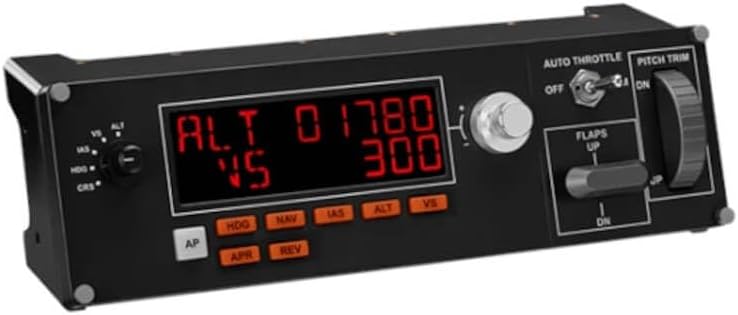
The Logitech G USB G Pro Flight Multi Panel is an easy-to-use and set-up product that is a good addition to Flight Simulator 2020 for flight simmers. It works great with MSFS 2020, saving time and making the flying experience more enjoyable. It serves as an autopilot for aircraft with a digital airspeed indicator, and includes adjustments for altitude, vertical speed, heading, and more. The drawbacks include the slow adjustment of the trim wheel, the lack of replacement options, and the panel sometimes being buggy.
Customer Reviews & Ratings
-
5 од
100%
-
4 од
0%
-
3 од
0%
-
2 од
0%
-
1 од
0%
Энэ бараанд шүүмж өгөх
Бусад хэрэглэгчидтэй санал бодлоо хуваалцана уу
Давуу тал
- easy to use and set-up
- a good addition to Flight Simulator 2020 for flight simmers
- visual screen readout of autopilot settings during flight
- adds realism to the simulation
- time-saver and aggravation-saver
Сул талууд
- slow adjustment of the trim wheel
Platform Trust & Buyer Confidence
“The product received very good packaging & safe…Thank You”
“Accurate delivery timing given”
“Not madly expensive like I thought, and much quicker than promised.”
“Never dealt with Ubuy before, but everything worked out great. Seamless cross border purchasing and shipping. Thanks!”
“The process was smooth, with clear communication and timelines. This was my 1st purchase and I am really impressed. I will definitely be coming back.”
Product Price History
Чухал мэдээлэл
- Хязгаарлалт : Олон улсын хүргэлтээр илгээгдсэн барааны тохиолдолд, үйлдвэрлэгчийн баталгаа хүчингүй байх, үйлдвэрлэгчийн үйлчилгээ хүргэх боломжгүй, барааны заавар, гарын авлага болон анхааруулга очих улсын хэлдээр биш байх магадлалтай гэдгийг анхаарна уу. Мөн бараа болон дагалдах хэрэгсэл нь тухайн улсын стандартыг мөрдөөгүй, чанарын заалт болон шошгын шаардлагыг хангаагүй байх магадлалтай бөгөөд, тухайн улсын цахилгааны вольтод тохирохгүй байж болзошгүй (тохирох адаптер болон хувиргагч шаардлагатай) юм. Хүлээн авагч нь барааг тухайн улс уруу хуулийн дагуу импортлогдохыг батлах ёстой. Ubuy болон түүний холбоот түншүүдээс худалдан авсан тохиолдолд худалдан авагч нь хүлээн авах улсын бүх хууль болон заалтуудыг мөрдөх ёстой.
- Ubuy нь дэлхий даяар хэрэглэгддэг хайлтын хэрэгсэл учраас Ubuy дээр байгаа бараа бүр зарагдана гэсэн үг биш. Бараанууд нь экспорт болон худалдааны журмыг дагаж мөрдөх ёстой.
MNT 678636
Яг одоо захиалаад ойрын хугацаанд хүлээн аваарай Бямба гараг, 7 дугаар сар 18
This item is not restrict in my country.(Please click on above link if this item is not restrict in your country, So our team will review and allow.)
QTY:
Ubuy works hard to protect your security and privacy. Our advanced payment security system ensures confidentiality by encrypting your information during transmission using AES (Advanced Encryption Standards) and SSL (Secure Socket Layer) protocols. Your payment details are 100% secure as we do not share your payment details with third party sellers.
Онцлог & Давуу талууд
- Full autopilot LED display
- Removes the need for onscreen controls
- Adjust settings with an integrated dial
- Control throttle, flaps, and elevator trim
- Compatible with popular flight simulator software
- Physical controls immediately trigger in-sim actions