- Нүүр хуудас /
- Цахилгаан бараа /
- Computer Accessories /
- Computer Accessories & Peripherals /
- Keyboards, Mice & Accessories /
- Computer Keyboards /
- BLACKMAGIC Design Davinci Resolve Speed Edito...
0 ratings






зүйлийн дугаар:
33467923
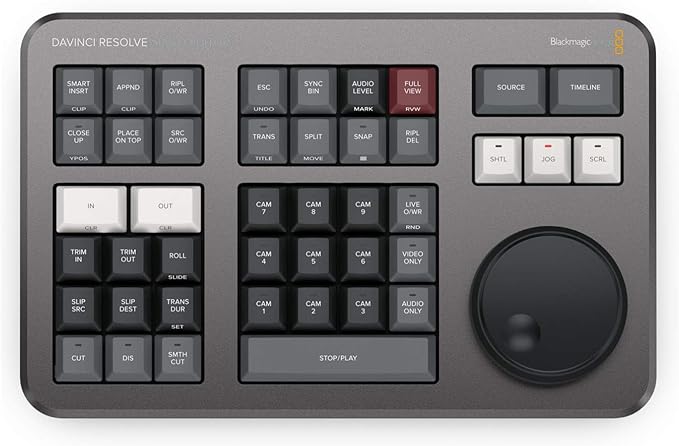
BLACKMAGIC Design Davinci Resolve Speed Editor (DV/RES/BBPNLMLEKA) Editor Only
зүйлийн дугаар:
33467923
MNT 1933877
Price Details
Excluding Shipping & Custom charges ( Shipping and custom charges will be calculated on checkout )
*All items will import from АНУ
0 ratings
Шүүмж бичих
Нөөцөд байна
 USA дэлгүүрээс импортолсон
QTY:
Зөвхөн 1 зүйл нөөцөд үлдсэн.
Яг одоо захиалаад ойрын хугацаанд хүлээн аваарай Бямба гараг, 6 дугаар сар 27
Secured transaction
Ubuy works hard to protect your security and privacy. Our advanced payment security system ensures confidentiality by encrypting your information during transmission using AES (Advanced Encryption Standards) and SSL (Secure Socket Layer) protocols. Your payment details are 100% secure as we do not share your payment details with third party sellers.
Our Top Logistics Partners


DaVinci Resolve delivers the cut of the next generation.

Fast
Shipping

Free
Return*

Secure Packaging

100% Original Products

PCI DSS Compliance

ISO 27001 Certified


Note: Step Down Voltage Transformer required for using electronics products of АНУ store (110-120). Recommended power converters Одоо худалдаж авах.


What Stands Out
Dedicated Editing Tool
The Speed Editor offers a streamlined, dedicated interface tailored for professional video editing, significantly enhancing workflow efficiency compared to general-purpose tools.
Smart Playback Controls
Equipped with intelligent playback features, it simplifies timeline navigation and clip editing, allowing users to focus more on creativity without getting bogged down by technical limitations.
Robust Software Integration
Seamlessly integrates with DaVinci Resolve, providing instant access to essential editing functions, which empowers creators to produce high-quality content faster and with less friction.
Бүтээгдэхүүний дэлгэрэнгүй мэдээлэл
- Compact and portable BLACKMAGIC DESIGN DaVinci Resolve Speed Editor
- Features built-in Search Dial and Keyboard Shortcuts for quick editing functions
- Offers Bluetooth or USB Connectivity for wireless or wired use
- Provides dedicated push buttons for controlling edit modes, timeline navigation, and effects
- Comes with a rechargeable battery and can be connected to a computer via USB Type-C cable
- Designed to work seamlessly with macOS or Windows editing systems running DaVinci Resolve
| Compatible Devices | PC |
| Connectivity Technology | Usb |
| Additional Features | Portable |
| Keyboard Backlighting Color Support | Single Color |
| Power Source | USB-C |
| Switch Type | Tactile |
| Keyboard Layout | QWERTY |
| Hand Orientation | Ambidextrous |
| Button Quantity | 104 |
| Mechanical Keyboard Switch Model | Tactile |
| Minimum Required Operating System Version | Windows 10 |
| Compatible Operating System Family | Windows |
| Number of Keys | 104 |
| Color | Black |
| Style Name | Contemporary |
| Theme | RGB |
| Brand | Blackmagic-Design |
| Keyboard Description | USB |
| Antenna Location | Location |
| Built-In Media | BLACKMAGIC DESIGN DaVinci Resolve Speed Editor |
| Model Number | DV/RES/BBPNLMLEKA |
| Global Trade Identification Number | 09338716006988 |
| Unit Count | 1.0 Count |
| Manufacturer | Blackmagic Design |
| Mfr Part Number | DV/RES/BBPNLMLEKA |
| Item Weight | 1 Kilograms |
| Item Dimensions L x W x H | 6.14"L x 9.65"W x 1.73"H (15.6 x 24.5 x 4.4 cm) |
| Enclosure Material | Plastic |
| Recommended Uses For Product | Location |
| Special Feature | Portable |
| Keyboard backlighting color support | Single Color |
| Style | Contemporary |
| Product Dimensions (L x W x H) | 6.14"L x 9.65"W x 1.73"H (15.6 x 24.5 x 4.4 cm) |
What's in the box
BLACKMAGIC DESIGN DaVinci Resolve Speed Editor
Who Should Buy?

-
Professional Editors
Ideal for professional video editors seeking efficient tools to enhance their editing speed and workflow in DaVinci Resolve.
-
Content Creators
Perfect for content creators who aim to produce high-quality videos quickly using intuitive controls and shortcuts.
-
Film Students
Great for film students looking to familiarize themselves with industry-standard tools while learning video editing skills effectively.

-
Casual Users
Not suitable for casual users who need simple editing tools, as it requires a learning curve for effective use.
-
Budget-Conscious Buyers
May not be ideal for budget-conscious individuals looking for basic editing solutions without investing in advanced equipment.
-
Non-Editing Professionals
Not recommended for those outside the editing profession, as they may not utilize its full feature set effectively.
БАРААНЫ ТАЙЛБАР
Асуулга байна уу? Бидэнтэй чатлаарай
Хэрэглэгчийн асуулт ба хариултууд
-
Асуулт:
What is the BLACKMAGIC DESIGN Davinci Resolve Speed Editor?
Хариулт: The BLACKMAGIC DESIGN Davinci Resolve Speed Editor is a professional editing keyboard designed specifically for use with DaVinci Resolve software. It features an innovative layout that enhances editing efficiency, including a unique multi-function knob for quick access to various editing functions. This tool is ideal for video editors looking to streamline their workflow, making it easier to navigate timelines, adjust settings, and trim clips seamlessly. -
Асуулт:
How does the Speed Editor enhance video editing workflows?
Хариулт: The Speed Editor is engineered to minimize the traditional reliance on mouse clicks and keyboard shortcuts, allowing editors to focus on their creative process. Its compact design houses buttons tailored to essential editing and playback features, enabling users to perform complex actions quickly. This makes it perfect for both professional and novice editors aiming for a faster, more intuitive editing experience. -
Асуулт:
What functionalities does the multi-function knob support?
Хариулт: The multi-function knob on the Speed Editor allows for precise control over various settings, such as timeline navigation, clip speed adjustments, and zooming in and out of sections. By simply rotating or pressing the knob, users can easily access critical functions that would typically require multiple keystrokes or mouse actions. This makes it an invaluable tool for filmmakers and video content creators who need to operate quickly without sacrificing accuracy. -
Асуулт:
Is the Speed Editor compatible with all versions of DaVinci Resolve?
Хариулт: Yes, the Speed Editor is compatible with all versions of DaVinci Resolve, including the free version. This means that whether you’re using DaVinci Resolve for basic editing or advanced color grading, you can take full advantage of the Speed Editor's capabilities. It is particularly beneficial for users looking to optimize their editing process in high-pressure environments, like film production sets or post-production studios. -
Асуулт:
What types of projects is the Speed Editor best suited for?
Хариулт: The Speed Editor is designed for a wide range of projects, from short films to full-length documentaries and corporate videos. Its features cater to both multi-camera edits and straightforward cuts, making it versatile enough for various producing styles. Users working on time-sensitive projects will find that the Speed Editor significantly accelerates their editing speed, allowing for fast turnaround times in high-demand situations. -
Асуулт:
Does the Speed Editor come with any software?
Хариулт: The Speed Editor does not come with a separate software package as it is primarily designed to work with DaVinci Resolve, which is available as a free download. Upon purchasing the Speed Editor, you will be able to immediately leverage its full potential alongside the powerful editing tools offered by DaVinci Resolve, making it an excellent addition for anyone serious about video editing. -
Асуулт:
Can I integrate the Speed Editor with other video editing software?
Хариулт: The Speed Editor is specifically designed for DaVinci Resolve, and while some basic features may work with other software, optimal functionality is achieved when used within the DaVinci Resolve ecosystem. For editors who predominantly use Resolve, this integration enhances their workflow, allowing for a more specialized experience that caters to the nuances of the software. -
Асуулт:
What are some user settings I can customize on the Speed Editor?
Хариулт: You can customize several user settings on the Speed Editor, including shortcuts for favorite tools, layout adjustments, and knob functions through the DaVinci Resolve preferences. This allows each user to tailor the Speed Editor to their editing style and preferences, making workflows more intuitive and personal. Customizations are particularly useful for seasoned editors who have specific techniques they prefer to use. -
Асуулт:
How does the Speed Editor compare to traditional editing setups?
Хариулт: The Speed Editor offers a more streamlined alternative compared to traditional setups that often rely on a mouse and keyboard combo. Its tactile controls allow for a more immersive editing experience, as you can manipulate timelines in real-time without losing focus on the project. Video editors can complete edits more efficiently while maintaining a strong connection with their material, enhancing overall productivity. -
Асуулт:
Where can I buy BLACKMAGIC DESIGN Davinci Resolve Speed Editor DVRESBBPNLMLEKA in Mongolia?
Хариулт: You can buy the BLACKMAGIC DESIGN Davinci Resolve Speed Editor DVRESBBPNLMLEKA from Ubuy. They offer a wide selection of electronics and tools for video editing, making it easy for you to purchase this professional editing keyboard. Ubuy provides a user-friendly shopping experience and ensures that you can quickly find the Speed Editor to enhance your editing skills.
BlackmagicDesign Keyboards DV/RES/BBPNLMLEKA Editorial Review


The DaVinci Resolve Speed Editor is a device designed for editing videos and does not have the feature to speed up or slow down videos during live feeds. The listing includes the Speed Editor and the required 1.5m USB Type-C Cable. It also comes with a DaVinci Resolve Studio License, which is the paid version of the software. The product is highly recommended by customers who found it easy to use, increased their editing precision, and sped up their editing process. Some customers have expressed disappointment as they did not receive the DaVinci Resolve Studio License, despite the product being sold at the same price by other vendors.
Customer Reviews & Ratings
259 Хэрэглэгчийн үнэлгээ
-
5 од
70%
-
4 од
12%
-
3 од
4%
-
2 од
3%
-
1 од
11%
Энэ бараанд шүүмж өгөх
Бусад хэрэглэгчидтэй санал бодлоо хуваалцана уу
Давуу тал
- Easy to use
- Increases editing precision
- Speeds up the editing process
Сул талууд
- Some customers did not receive the DaVinci Resolve Studio License, which is included by other vendors at the same price.
Product Price History
Чухал мэдээлэл
- Хязгаарлалт : Олон улсын хүргэлтээр илгээгдсэн барааны тохиолдолд, үйлдвэрлэгчийн баталгаа хүчингүй байх, үйлдвэрлэгчийн үйлчилгээ хүргэх боломжгүй, барааны заавар, гарын авлага болон анхааруулга очих улсын хэлдээр биш байх магадлалтай гэдгийг анхаарна уу. Мөн бараа болон дагалдах хэрэгсэл нь тухайн улсын стандартыг мөрдөөгүй, чанарын заалт болон шошгын шаардлагыг хангаагүй байх магадлалтай бөгөөд, тухайн улсын цахилгааны вольтод тохирохгүй байж болзошгүй (тохирох адаптер болон хувиргагч шаардлагатай) юм. Хүлээн авагч нь барааг тухайн улс уруу хуулийн дагуу импортлогдохыг батлах ёстой. Ubuy болон түүний холбоот түншүүдээс худалдан авсан тохиолдолд худалдан авагч нь хүлээн авах улсын бүх хууль болон заалтуудыг мөрдөх ёстой.
- Ubuy нь дэлхий даяар хэрэглэгддэг хайлтын хэрэгсэл учраас Ubuy дээр байгаа бараа бүр зарагдана гэсэн үг биш. Бараанууд нь экспорт болон худалдааны журмыг дагаж мөрдөх ёстой.
MNT 1933877
Яг одоо захиалаад ойрын хугацаанд хүлээн аваарай Бямба гараг, 6 дугаар сар 27
This item is not restrict in my country.(Please click on above link if this item is not restrict in your country, So our team will review and allow.)
QTY:
Зөвхөн 1 зүйл нөөцөд үлдсэн.
Secured transaction
Ubuy works hard to protect your security and privacy. Our advanced payment security system ensures confidentiality by encrypting your information during transmission using AES (Advanced Encryption Standards) and SSL (Secure Socket Layer) protocols. Your payment details are 100% secure as we do not share your payment details with third party sellers.
Our Top Logistics Partners
Fastest cross-border delivery
Онцлог & Давуу талууд
- Designed specifically for the cut workspace to enhance cutting speed.
- Experience unparalleled precision with tactile touch controls and metal search regulator.
- Wireless Bluetooth connectivity and USB-C option for ultimate portability.
- Enhanced workflow with dedicated cut-specific keys and live trimming capabilities.
- Transport buttons allow for rapid playback control with easy thumb access.
- Innovative Source Tape mode simplifies clip selection, making your workflow more efficient.